Introduction
In the digital age, lyric transcription has become an essential task for musicians, content creators, and educators. While online tools offer convenience, they often come with privacy concerns and require a stable internet connection. Offline lyric transcription tools provide a secure and reliable alternative, ensuring that your audio files remain private and accessible at all times.
Benefits of Offline Lyric Transcription Tools
Enhanced Privacy
Offline tools process audio files directly on your device, eliminating the need to upload sensitive content to external servers. This is particularly important for professionals handling confidential recordings or unreleased music.
Consistent Accessibility
Without reliance on internet connectivity, offline transcription tools are always available, whether you're in a remote location or experiencing network issues. This ensures uninterrupted workflow and productivity.
Cost-Effective Solutions
Many offline transcription tools operate on a one-time purchase model, avoiding the recurring fees associated with subscription-based online services. This can lead to significant cost savings over time.
Top Offline Lyric Transcription Tools
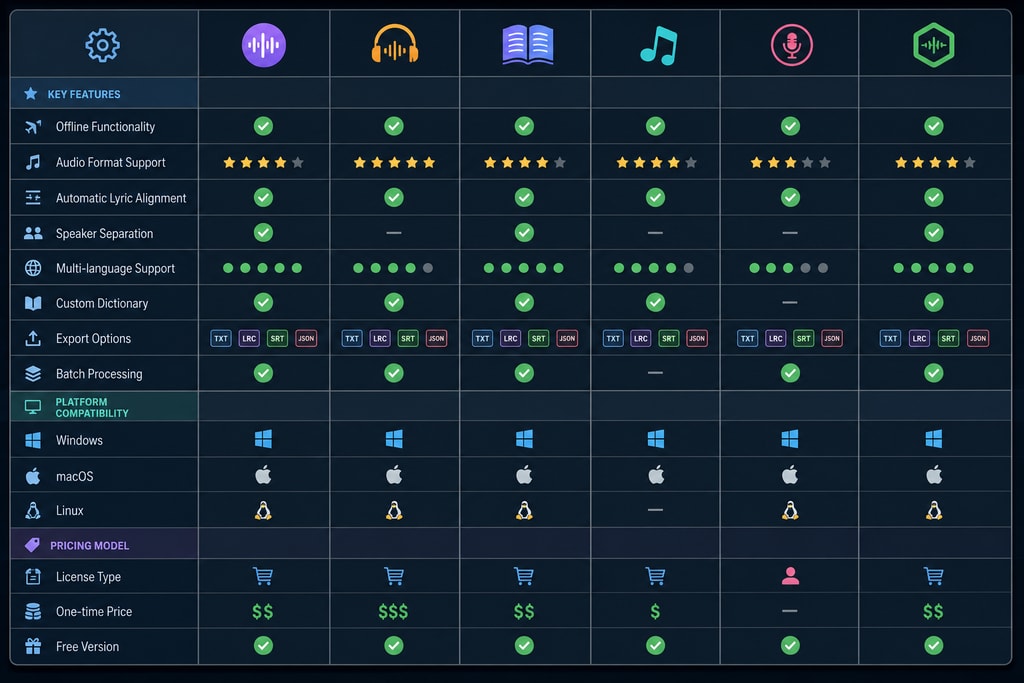
When selecting an offline lyric transcription tool, consider factors such as platform compatibility, accuracy, and additional features. Here are some notable options:
1. Vovsoft Audio to Lyrics Converter
Platform: Windows
Features:
- Supports various audio formats, including MP3, WAV, OGG, and FLAC.
- Utilizes OpenAI's Whisper models for accurate transcription.
- Offers adjustable settings for transcription speed and accuracy.
- Provides options for line length customization to suit different display requirements.
Pricing: One-time purchase of $19.
Source: Vovsoft Audio to Lyrics Converter
2. MacWhisper
Platform: macOS
Features:
- Drag-and-drop functionality for easy audio file transcription.
- Supports multiple languages and dialects.
- Offers batch processing for multiple files.
- Provides options for exporting transcripts in various formats.
Pricing: One-time purchase of approximately $69.
Source: 360Converter Blog
3. Whisper Transcription
Platform: macOS and iOS
Features:
- Real-time dictation and audio file transcription.
- Supports multiple languages.
- Offers integration with various applications.
- Provides options for editing and exporting transcripts.
Pricing: Subscription-based with a lifetime in-app purchase option.
Source: 360Converter Blog
4. Buzz
Platform: Windows, macOS, and Linux
Features:
- Open-source and free to use.
- Supports transcription of audio files and live dictation.
- Offers basic speaker diarization.
- Provides options for exporting transcripts in various formats.
Pricing: Free.
Source: 360Converter Blog
5. Whisper.cpp
Platform: Windows, macOS, and Linux
Features:
- Command-line interface for advanced users.
- Supports transcription of audio files.
- Offers scripting capabilities for automation.
- Provides options for exporting transcripts in various formats.
Pricing: Free.
Source: 360Converter Blog
Choosing the Right Tool: A Checklist
Selecting the appropriate offline lyric transcription tool depends on your specific needs and preferences. Consider the following factors:
- Platform Compatibility: Ensure the tool is compatible with your operating system.
- Accuracy: Look for tools that utilize advanced AI models for precise transcription.
- File Format Support: Verify that the tool supports the audio formats you commonly use.
- Additional Features: Consider features like batch processing, speaker diarization, and export options.
- Pricing Model: Decide between free, one-time purchase, or subscription-based models based on your budget.
Practical Examples of Usage
Imagine you're a musician working on an unreleased album. Using offline tools like Vovsoft ensures your content remains secure during transcription. Similarly, educators can use MacWhisper for batch processing lecture transcriptions, streamlining workflow.
Mistakes to Avoid
Avoid choosing tools based solely on price. Consider the full range of features and support. Ensure the chosen tool supports your preferred languages and audio formats to avoid compatibility issues.
Topic-Specific Advice
For musicians: Prioritize tools with high accuracy and customization options to enhance the quality of lyric transcriptions, such as Vovsoft Audio to Lyrics Converter.
For educators: Opt for tools offering batch processing capabilities to save time on transcribing multiple audio files, like MacWhisper.
Frequently Asked Questions (FAQ)
Q: Are offline transcription tools as accurate as online services?
A: Many offline tools utilize advanced AI models, offering accuracy comparable to online services. However, performance may vary based on the tool and hardware capabilities.
Q: Can I use offline transcription tools for live dictation?
A: Some tools, like Whisper Transcription, offer real-time dictation features. It's essential to check the specific capabilities of each tool.
Q: Do offline transcription tools support multiple languages?
A: Yes, many tools support various languages and dialects. Verify the language support of the tool you're considering.
Q: Is there a learning curve associated with these tools?
A: User-friendly interfaces like those of Vovsoft Audio to Lyrics Converter and MacWhisper minimize the learning curve. However, command-line tools like Whisper.cpp may require technical proficiency.
Q: What should I do if the transcription isn’t accurate?
A: Check for audio quality issues, ensure the correct language settings are applied, and utilize built-in editing features for manual corrections.
Sources and Further Reading
Relevant Links
For more music solutions and software, visit the KaraMagic homepage and explore LyricMagic Free, perfect for creating lyric videos from audio files.
Conclusion
Offline lyric transcription tools offer a secure, reliable, and cost-effective solution for converting audio files into text. By carefully evaluating your needs and the features of each tool, you can select the best option to enhance your music projects. For Mac users seeking a comprehensive solution, KaraMagic provides a suite of applications designed for creating karaoke and lyric videos entirely offline, ensuring both privacy and accuracy.